
Totality Nutrition guide
Start here
What Totality Nutrition does, what Free and the paid plans include, and the quickest way to get set up.
Totality Nutrition is a calorie and macro tracker built on Australian food data. You log what you eat, it shows calories, protein, carbs and fat against your own targets, and it keeps your history. It runs on Android and in your web browser at totalitynutrition.com.au, and the iPhone app is with Apple for review (until it's out, use the web app in Safari). Your account is the same everywhere.
The two tiers#
Every account is one of these:
- Free A$0, forever. Food logging by search with your full history, calories and macros against your targets, water, weight and Progress, the calculator, up to 10 saved meals, 7 barcode scans a week and Tell Tali what you ate 3 times a day, the Cookbook's 200 recipes to read and Sleep sounds. No ads.
- Paid Nutrition (A$8.99 a month) or Nutrition + AI (A$11.99 a month). Paid adds Insights, Breakdown, Meal Plan, Grocery List, Recipes, saving and planning from the Cookbook, unlimited saved meals, unlimited barcode scans and Apple Health or Health Connect. Nutrition + AI also adds Tali's AI features with 100 credits a month.
Every new account starts with a 7 day trial Trial of the full Nutrition plan. No card is needed. When the 7 days are up you move to Free, unless you pick a plan. Nothing is deleted. See Plans compared for the full table.
Throughout this guide, badges show who gets what: Free Trial Paid.
Get set up in five minutes#
- Create your account with your name, email and a password. See Create your account.
- Answer five quick onboarding questions: units, goal, training days, body stats and date of birth. See Onboarding.
- Check the targets it works out for you and tap Get Started.
- Take Tali's short tour of Home. It takes under a minute. See Home and the tour.
- Log your first meal. Tap Log Food, then search, scan a barcode or tell Tali what you ate. See Your food log.
Where things live#
The bar along the bottom has four tabs:
| Tab | What it is |
|---|---|
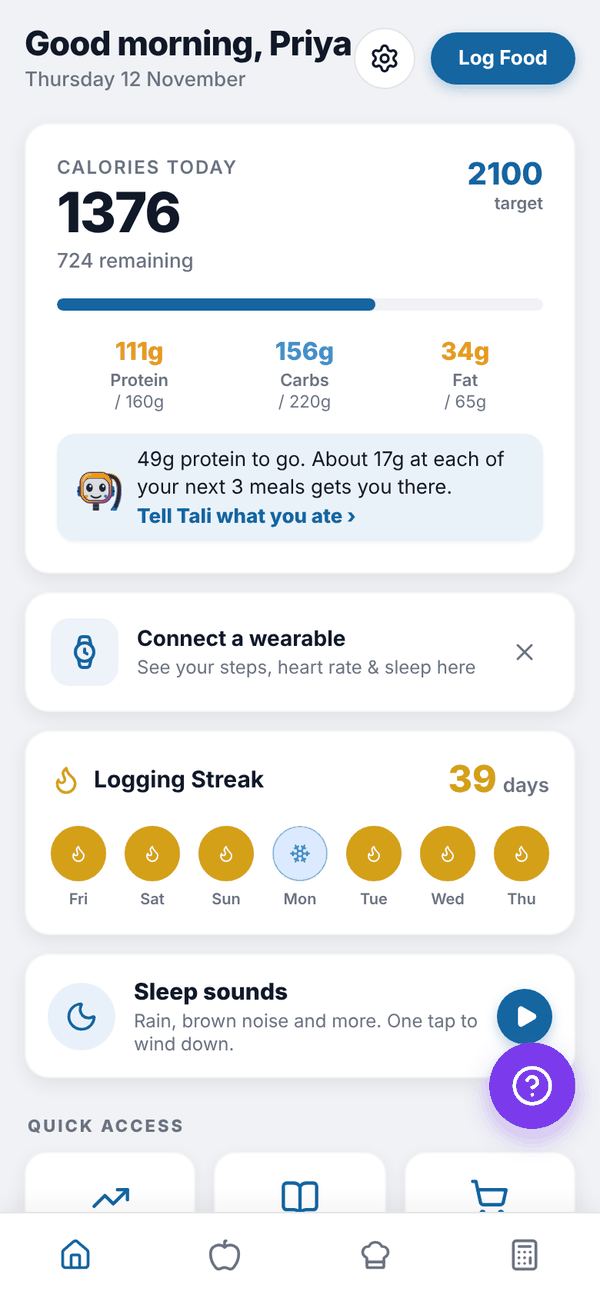
| Home (house) | Today's calories and macros, your streak, Quick access tiles and Sleep sounds |
| Nutrition (apple) | Your food log for the day, meal by meal |
| Cookbook | 200 high protein meals to browse, save and plan. See Cookbook |
| Calculator | Work out or redo your calorie and macro targets |
Everything else opens from Home: Breakdown, Meal Plan, Grocery List, Hydration, Insights and Progress are the Quick access tiles, the Sleep sounds card opens Sleep sounds, and the gear icon at the top opens Settings.
The purple ? button that floats on most screens opens Report an Issue. See Troubleshooting.
Questions#
Is Totality Nutrition really free?
Yes. The Free plan is A$0 with no time limit and no ads. You keep food logging, your full history, targets, water, weight, Progress, 7 barcode scans a week, up to 10 saved meals, Tell Tali 3 times a day, the Cookbook to read and Sleep sounds.
Do I need a card for the trial?
No. The 7 day trial needs no card. If you don't pick a plan, you move to Free when it ends.
Can I use it on my computer?
Yes. Open totalitynutrition.com.au in any browser and log in with the same email and password. Barcode scanning by camera and wearables need the phone app; on the web you can type a barcode number instead.
I already use Totality with my trainer. Do I need a new account?
No. Log in with your Totality email and password. See Using Nutrition with a Totality trainer.