
Totality for clients
Frequently asked questions
Short answers to the questions clients and gym members ask most, with links to the full steps.
Tap a question to see the answer. Use the search box at the top to find anything else.
Getting started#
What is Totality?
The app your personal trainer or gym uses to coach you. You see your programme, log workouts and food, check in each week, book sessions and classes, message your trainer and pay your gym. See Welcome to Totality.
Does it cost me anything?
No. The client app is free. Your trainer or gym pays for Totality. Any memberships, packages or classes you buy are paid to your gym or trainer.
How do I get an account?
Your trainer or gym invites you. You get an email called "You've been invited to Totality as a Client". Tap Set up your account and choose a password. See Your invite and first log in.
Can I sign up without an invite?
The Get Started: It's Free button is for trainers and gyms. Clients come in through an invite from their trainer or gym.
The invite link doesn't work.
It works once and expires after an hour. Use Forgot Password? on the log in screen to get a fresh link.
Which app do I download?
Totality (orange icon). On the App Store it's called Totality for Gyms & Coaches. Or use totalityapp.com.au in a browser. See Install the app.
Can I use it on my computer?
Yes, at totalityapp.com.au. Log in with the same email and password.
How do I update the app?
Close it fully and open it again.
Your account#
I forgot my password.
On the log in screen tap Forgot Password?, type your email and tap Send Reset Link. See Forgot your password.
How do I change my password?
Settings > SECURITY > Change Password. See Settings.
How do I change my email?
You can't change it in the app. Ask your trainer or gym, or email admintotality@gmail.com.
How do I add a profile photo?
In Settings, tap the camera button on your photo.
How do I delete my account?
Settings, scroll to the bottom, Delete Account. It's permanent. See Delete your account.
Who can see my information?
Your trainer sees your training, check-ins, food and progress. If you're a gym member, the gym and its trainers can see your profile and training history. A gym can only see you after you accept its invite.
Training#
Where's my programme?
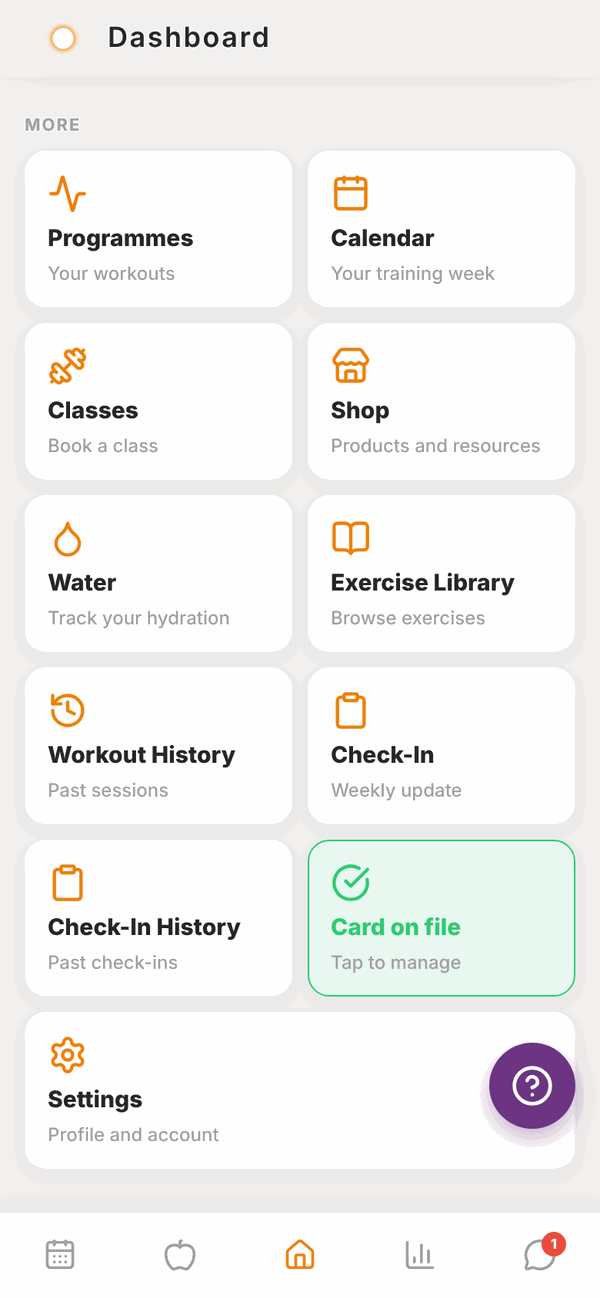
On Home, scroll to MORE and tap Programmes. Today's workout is at the top of Home. See Your programme and calendar.
Why does it say "No programme assigned yet"?
Your trainer hasn't given you one in Totality yet. Message them.
How do I log a workout?
Tap Start Workout, fill in your weight and reps for each set, tap Done after each one, then Finish & Save Session ✓. See Doing a workout.
What's RPE?
How hard a set felt, out of 10. 10 means you couldn't do another rep. It's optional.
Can I change an exercise?
Yes, for one session. Tap the arrows button on the exercise to swap it. Your programme doesn't change.
How do I watch how to do an exercise?
Tap the i button on the exercise, then Watch Demo Video. Or look it up in the Exercise library.
Can I move my workout to another day?
Yes, within the same week. Calendar, tap the day, Move to another day.
I trained on my own. Can I log it?
Yes. Workout History > Log a workout. See Workout history.
Where are my personal bests?
Workout History > Personal bests. New PBs also show on your summary after each workout.
What happens if the app closes mid-workout?
Your sets are kept on your phone. Open the workout again and carry on.
Check-ins#
When is my check-in due?
Sunday from 10am, and all day Monday. See Weekly check-ins.
Do I have to do it?
It really helps your trainer. If you can't, tap Skip This Week.
Where's my trainer's reply?
Open Check-In after submitting, or Check-In History.
Where do I add progress photos?
Progress (the bar chart button) > Photos. See Progress.
Food#
How do I log food?
Tap the apple button, then the orange + on a meal. Search, scan, tell Tali, or type it in. See Adding food.
What is Tell Tali?
Type what you ate in plain words, like "2 eggs on toast and a flat white", and Tali turns it into foods with amounts. You check them, then add. 5 times a day, free.
Can I scan barcodes?
Yes. Tap the orange phone button next to the search box. Works best in the phone app.
How do I save a meal I eat a lot?
Tap the star on that meal in your food log and give it a name. Log it again from Saved Meals.
Who sets my calorie and macro targets?
Usually your trainer. If they haven't, you can set your own from Home. See Nutrition targets.
Can I use kilojoules?
Yes. Settings > Units and region > Energy > kJ.
How do I track water?
Home > MORE > Water. Tap +250 ml, +500 ml or +750 ml, or type an amount.
Can I use my Totality login in Totality Nutrition?
Yes, the same email and password work. Your food log, saved meals, water and targets are shared. See Using Totality Nutrition too.
Schedule and classes#
How do I book a PT session?
Your trainer books them. Message your trainer with a time that suits.
How do I book a class?
Home > MORE > Classes. Tap the class, then the Book button. See Sessions, classes and credits.
The class is full.
Tap Class is full: join waitlist. You'll be told if a spot opens.
How do I cancel a class?
Open Schedule and tap Cancel booking. Paid classes aren't refunded automatically, contact your gym.
What are credits?
Paid PT sessions. Each session uses one. See them on your Schedule and in Payments > Credits.
Can my bookings go in my phone's calendar?
Yes. Settings > CALENDAR SYNC > Add to Google Calendar or Add to Apple Calendar.
Payments#
How do I add my card?
Home > Payment Method tile > Add card. See Payments.
How do I cancel my membership?
Payments > Memberships > Cancel membership, if your gym bills through Totality. Otherwise contact your gym.
Where are my receipts?
Payments > Purchases, under Receipts.
How do I get a refund?
Ask your gym or trainer. They handle refunds.
Messages and notifications#
How do I message my trainer?
Tap the speech bubble button, then your trainer's name. See Messages.
Can I send photos in messages?
No, messages are text only.
Why don't I get notifications?
Push only works in the phone app. Check Settings in Totality and on your phone. See Troubleshooting.
Wearables#
Can I connect my watch?
Through Apple Health on iPhone or Health Connect on Android. See Wearables.
Can I connect from the website?
No, only from the phone app. Your data still shows on the website once connected.
Help#
Who do I ask for help?
Your trainer or gym for your training, food, bookings and payments. Totality for app problems: the purple ? button or admintotality@gmail.com.
What's the purple question mark button?
It sends a problem report to the Totality team. See Troubleshooting.