
Tali HQ guide
Talk to Tali
Chat with Tali, have her think harder or get a second opinion, send voice notes and videos, and see everything she can do from a message.
Talk is where you chat with Tali. Write to her like you'd message a mate who never forgets. She answers, and from the same message she can remember a birthday, add something to a list, set a reminder, draft a message, log your lunch or a spend, or add a client.
Start a chat#
Tap Talk at the bottom. A brand new chat shows four starters: Help me plan my week, Write a follow-up for a client who went quiet, Give me 3 post ideas for this week and What should I focus on to grow? Tap one to put it in the box, or type your own.
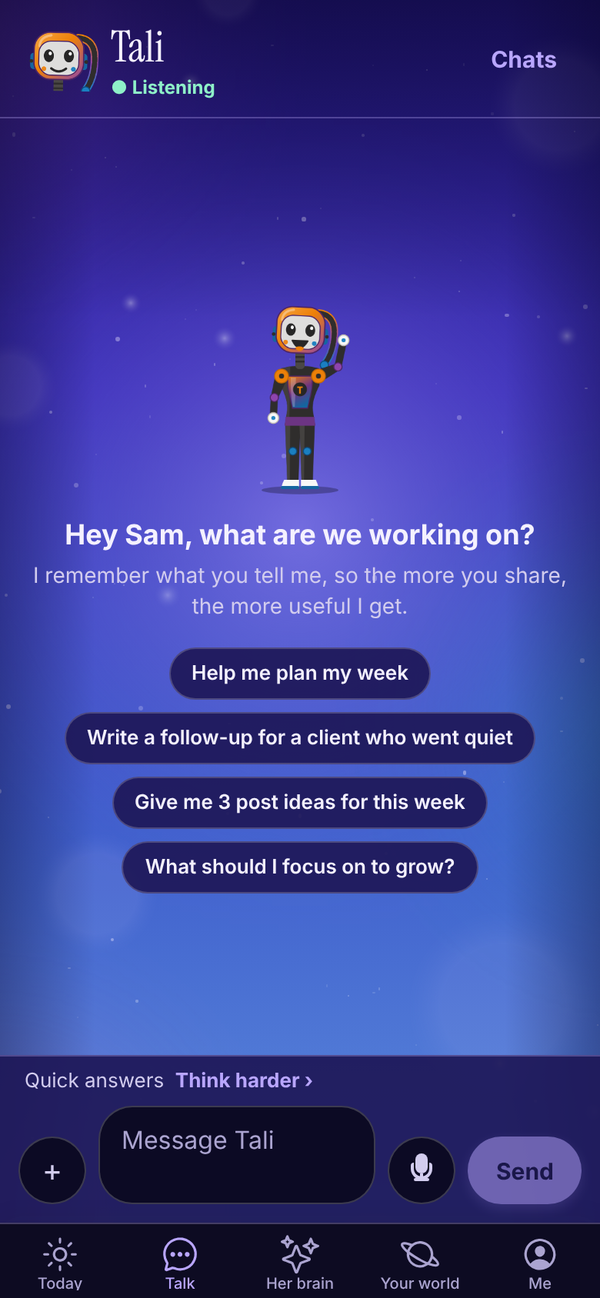
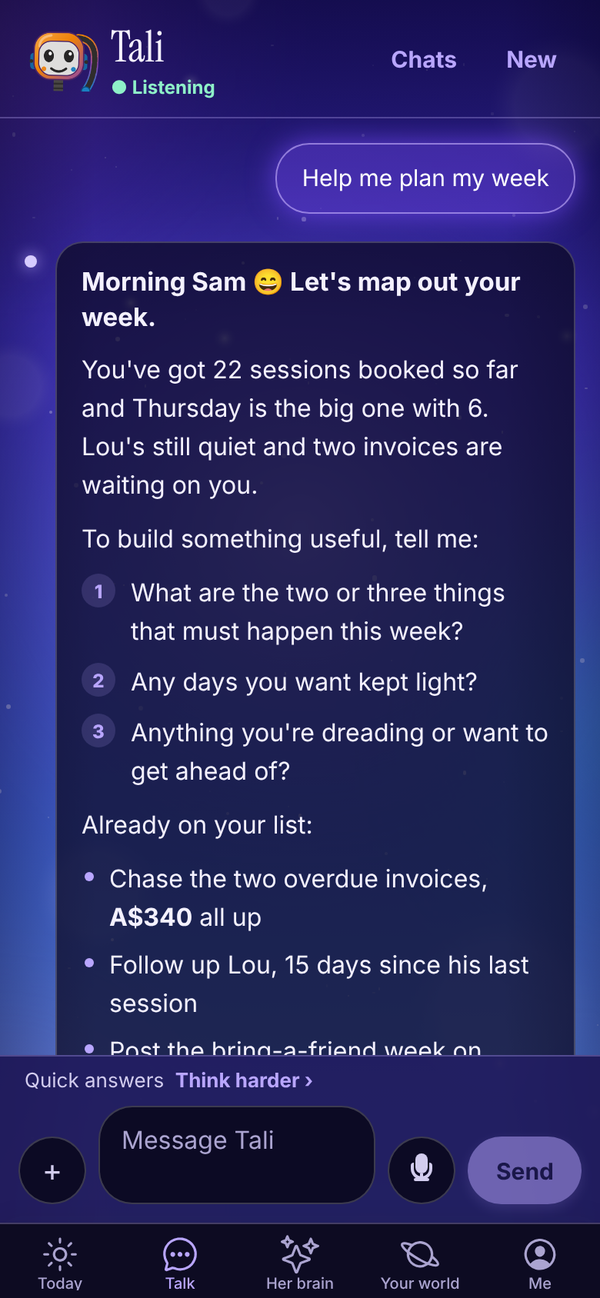
- Type in the Message Tali box. A message can be up to 2,000 characters.
- Tap Send.
- While Tali works, the line under her name says Thinking....
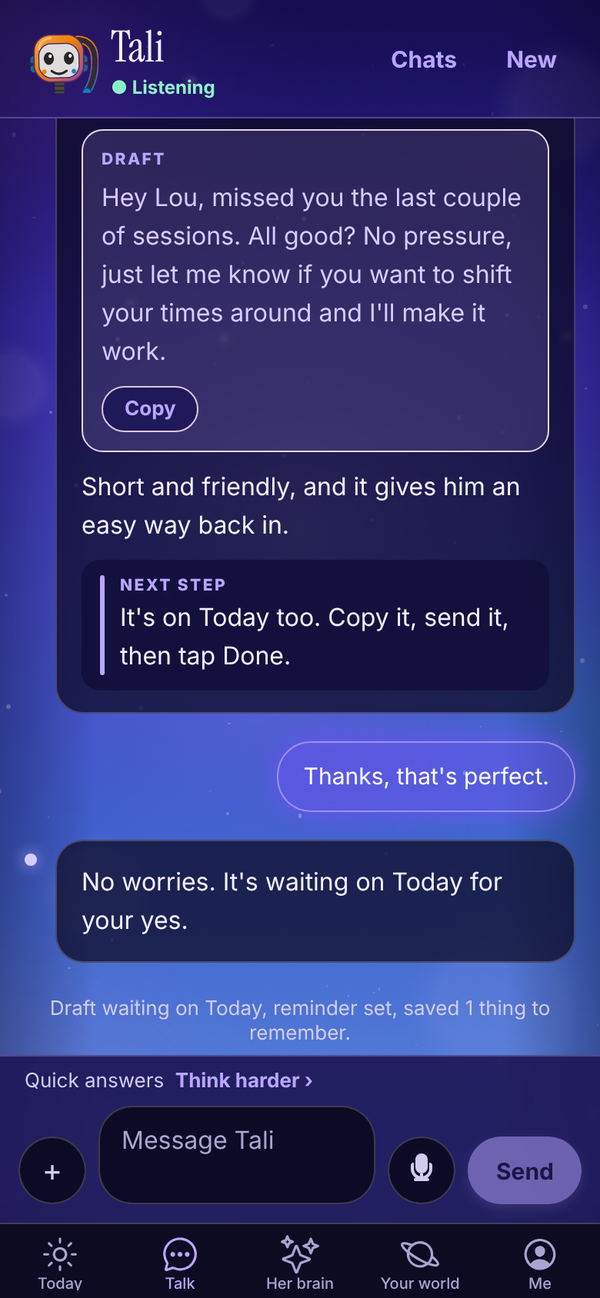
- Her reply appears on a dark panel. Long replies have a Copy link. If she did something as well, a short line above the box says what, for example "Draft waiting on Today, reminder set, saved 1 thing to remember."
What shows under a reply#
Small pills under Tali's reply tell you what she kept, and each one is a button.
- New memory: she saved something to her brain. Tap it to open Her brain at the group it was filed under, like "How you like things".
- Saved to your lists: she added to a list, ticked something off or marked a habit done. Tap it to open that list. See Your lists.
- Spend logged: she logged personal spending, with the total. Tap it to open Money on the Personal side. See Money. Tali HQ
What Tali can do from a message#
Just ask in plain words. She only does these when you ask.
- Remember things Free: facts about you, your business, people and preferences. Up to three new things per message. See Her brain.
- Draft messages and posts Free: texts, follow-ups, social posts. They wait on Today for you to copy and send. See Approvals.
- Keep track of your people Free: family, friends, clients and leads, with birthdays. "Mum's birthday is 14 December", or "Zack Donaldson is a new lead, follow up Thursday." See Your people and dates.
- Add to your lists Free: to do, check ups, life admin, jobs around the house, habits, learning, wins, someday and ideas. "Add to my to do: send the quote to Mia by Friday", "Car rego is due 29 November, every year", "I read my 20 pages today." Lists use no extra credits. See Your lists.
- Set reminders Free: "remind me to ring Lou at 4pm tomorrow". With no time given, she uses 9am on that day.
- Log a decision Free: "I've decided to raise PT to $90 from January because costs are up." See Decisions.
- Log food, weight and training, and write you a programme Free: see Food and training.
- Draft an invoice Tali HQ: "invoice Priya for 4 PT sessions at $80." See Invoices.
- Log what you spend Tali HQ: "spent $42 at Woolies." She logs it and tells you what's left for the week. See Money.
- Save and update goals Tali HQ: business or personal. "My goal is 5 more regular clients by February." See Goals and weekly review.
- Make an image Tali HQ: "make me a square image for my Christmas hours." Images are counted on their own, not in credits: 5 on the trial, 30 a month on Tali HQ, 100 on Pro and 300 on Max. Every image she makes is kept in the vision part of her brain.
- Draft emails from your Gmail or Outlook, and calendar bookings Tali HQ: needs Google or Microsoft connected. See Gmail and Outlook.
- Search the web Tali HQ: for things that change, like prices, rules, news and local businesses. She names her sources. Up to 3 searches a message.
- Read photos Free and PDFs Tali HQ: see How Tali's replies work.
- Watch a video Tali HQ: a screen recording, an ad or a walkthrough, up to 10 minutes and 200 MB. She tells you what she sees. 5 credits for each started minute.
- Talk about books: she has read the books on her shelf and has opinions on them. For a book that isn't on her shelf, she says she hasn't read it yet. See Tali's library.
She also knows your people, follow-ups, reminders, lists, birthdays coming up, unpaid invoices, business health, goals, this week's commitments and your last shutdown, plus your calendar and recent emails when they're connected. Ask "what's on this week?" or "who owes me money?" and she answers from your real data.
Think harder#
Above the message box is Think harder. Tap it to send your next message to a smarter Tali who brings more of her memory to the answer. Tap Quick answers to go back to normal.
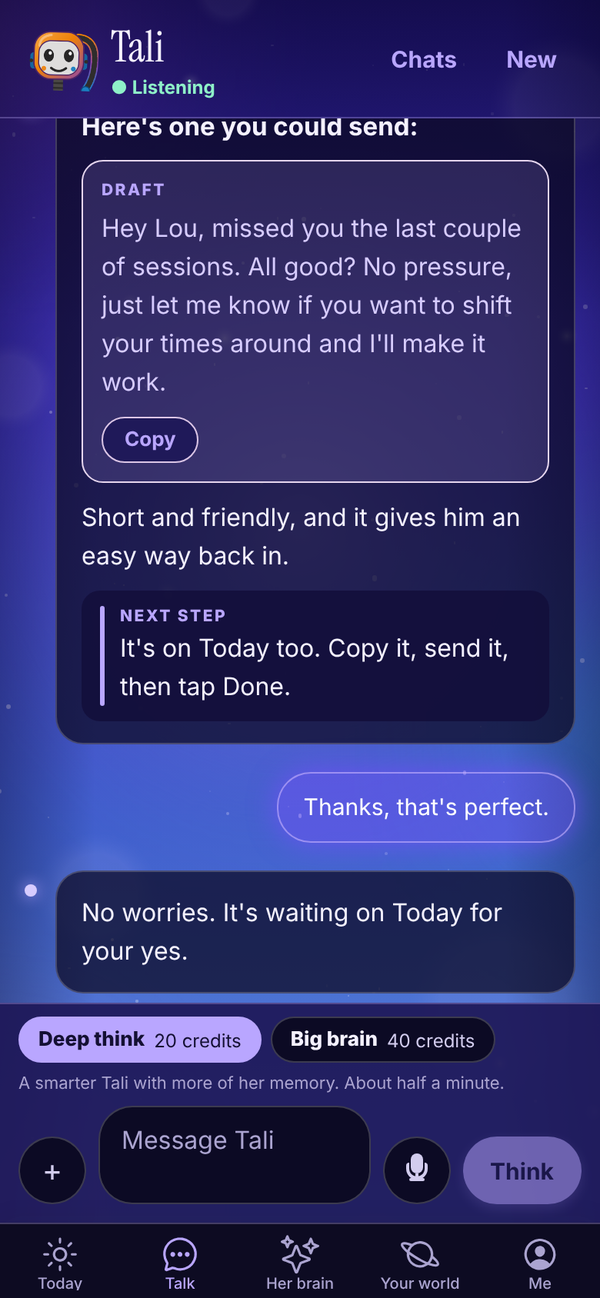
- Deep think: for questions that need real thought. About half a minute. 20 credits. Tali HQ On Free you get 1 Deep think a month.
- Big brain: her strongest thinking, for the big calls. About a minute. 40 credits. Pro
- Second opinion: Tali answers, then a second AI checks her. Under her reply you see where it Agrees and what it Would change. 20 credits. Tali HQ
Second opinion and video only show once they're switched on for your account. On the Plans screen, anything not switched on yet says Coming soon.
On Max, all three cost half the credits for your first 100 a month. Replies show a SHE THOUGHT HARDER or BIG BRAIN label. If a turn fails, the credits come back.
Sometimes, on a big question, Tali's normal reply ends with a Deep think this button. Tap it to ask the same question again with Deep think.
Voice notes Tali HQ#
Tap the microphone next to the message box, say it, and tap the red dot to stop. A voice note can be up to 3 minutes. Tali turns it into text and answers as normal. Each voice note uses 1 credit. Tali HQ and the trial include 30 minutes of voice notes a month. Pro and Max have no cap.
Your chats#
Tali remembers you across every chat, so starting a new one never loses anything she knows about you. Each chat still keeps its own history.
- New chat: tap it at the top right to start fresh. It only shows once the current chat has a message in it.
- Chats: opens Your chats, with pinned chats first, then the rest, newest first.
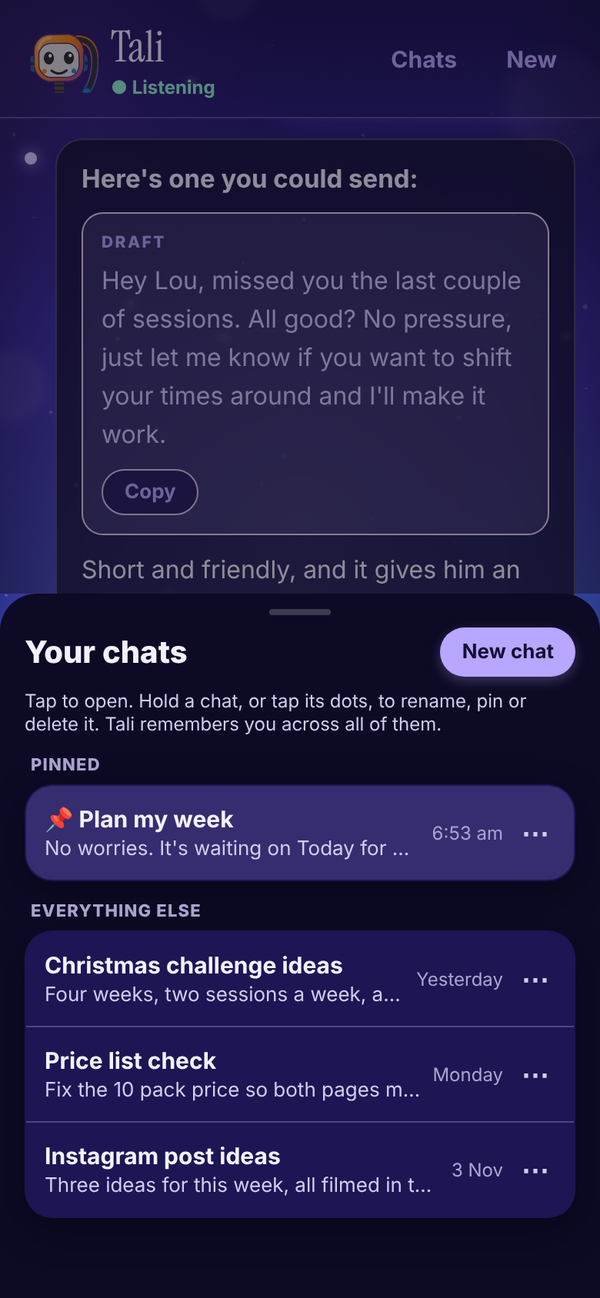
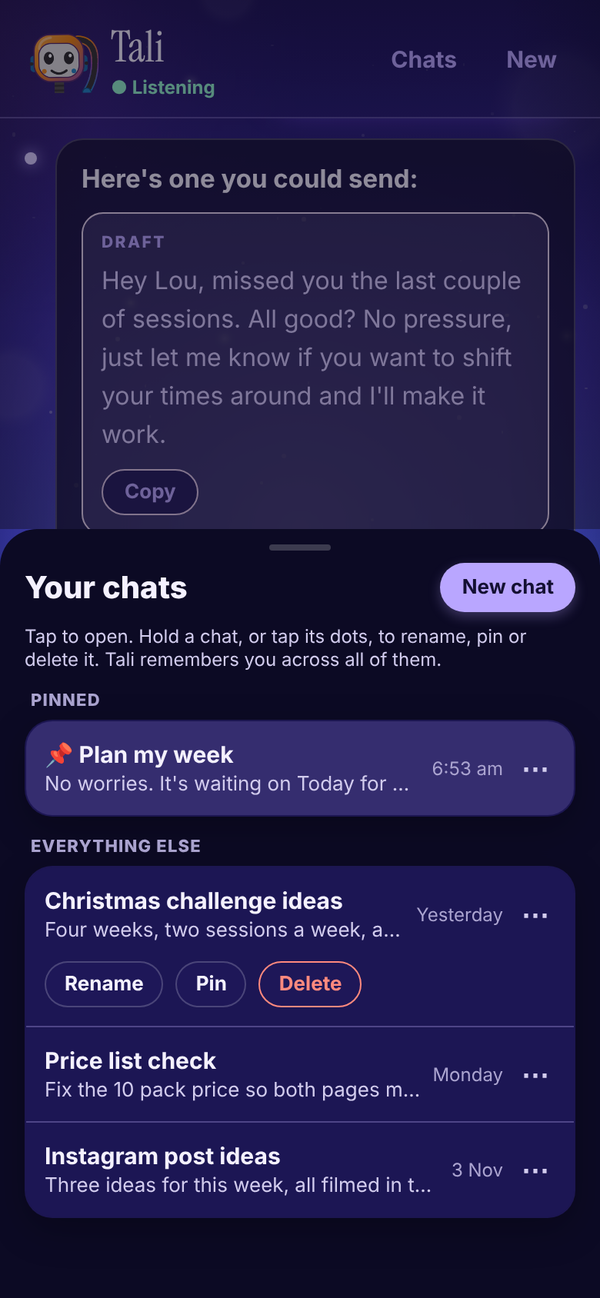
In Your chats:
- Tap a chat to open it.
- Tap the three dots (or press and hold a chat) for Rename, Pin or Unpin, and Delete.
- Rename: type the new name and press enter, or tap away.
- Delete asks "Delete this chat for good?". Tap Delete to confirm or Keep to stop. Deleting removes the chat and any files you sent in it. What Tali has already remembered from it stays until you forget it in Her brain.
If a message doesn't send#
If Tali can't be reached, your message shows Not sent. Try again and your words (and any files) go back in the box so nothing is lost. Tap Try again to resend it.
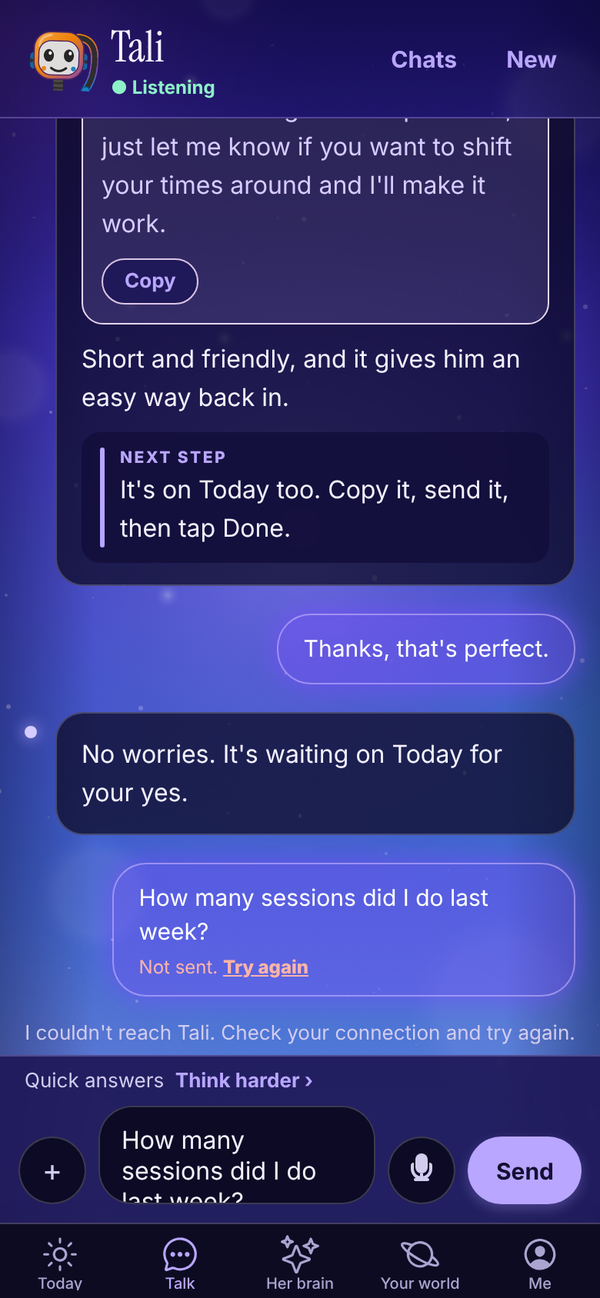
Other messages you might see:
- "That's your 250 free messages for this month. Upgrade to Tali HQ to keep chatting." Free
- "You've used this month's Tali credits. They top up on the 1st, or you can move up a plan." Tali HQ
- "Easy, tiger. Give me a minute and try again." You sent more than 20 things to Tali in 5 minutes. Wait a minute.
Ask Tali from other screens#
Some screens have an Ask Tali, Tell Tali or Talk to Tali button: a person's page, a goal, a decision, any list, Body and Money. It opens Talk with a ready question in the box. Check it, change it if you like, and tap Send.
Share things to Tali#
When Tali HQ is added to your home screen on Android, it shows up in your phone's share menu. Share a text, a link or a caption to Tali HQ and it lands in the Talk box as "Someone sent me this. What should I do with it?" with what you shared. Nothing sends until you tap Send.
How much a message costs#
- Free Each message counts as one of your 250 messages a month.
- Tali HQ Pro Each message uses 1 credit. A message with photos or a PDF uses 1 extra credit. Each web search uses 2 extra credits. Deep think is 20, Big brain 40, a second opinion 20, and a video 5 for each started minute.
When a paid plan runs out of credits, Talk shows a Top up button. See Plans, credits and billing.
If something goes wrong on Tali's side, the credit is given back. See Plans, credits and billing.
Questions#
Does Tali remember what I said in another chat?
Yes. What she learns about you goes into her memory of you, which she uses in every chat. Inside a chat she also reads the last 20 messages.
Tali got something wrong about me. How do I fix it?
Tell her in Talk ("actually, Priya trains Tuesdays"), or open Her brain, find the memory and fix or forget it.
What is the difference between Deep think and Big brain?
Both send your message to a stronger Tali with more of her memory. Deep think takes about half a minute and costs 20 credits. Big brain is her strongest thinking, takes about a minute, costs 40 credits and is on Pro and Max.
Can I edit a message after I send it?
No. Send a follow-up message with the correction and Tali will use it.
Why didn't Tali search the web?
Web search is on every plan: 10 searches a month on Free, and up to 150, 400 or 1,000 a month on Tali HQ, Pro and Max, at 2 credits each. Tali only searches for things that change or that she doesn't know, and never for personal details about private people.
Can Tali send a text or email for me?
She drafts it and it waits on Today. With Gmail or Outlook connected, you can send her email drafts with one tap from Today. Texts and social posts you copy and send yourself.
What happens to the words I typed if sending fails?
They go back in the box, with any files, and the failed message shows Try again.