Totality Nutrition for teams: seats for clients, members and staff

Totality Nutrition for teams

Cover Totality Nutrition for your clients, members or staff

Buy seats on one bill and hand them out with a team code. Each person gets the full Totality Nutrition app on their own account and pays nothing. Seats are a month each, with a seat minimum.

Sign in or create a free account first, then open Settings and tap Teams. Teams are started and paid for in the web app. Your people can join on the web or in the Android app.

New teams:

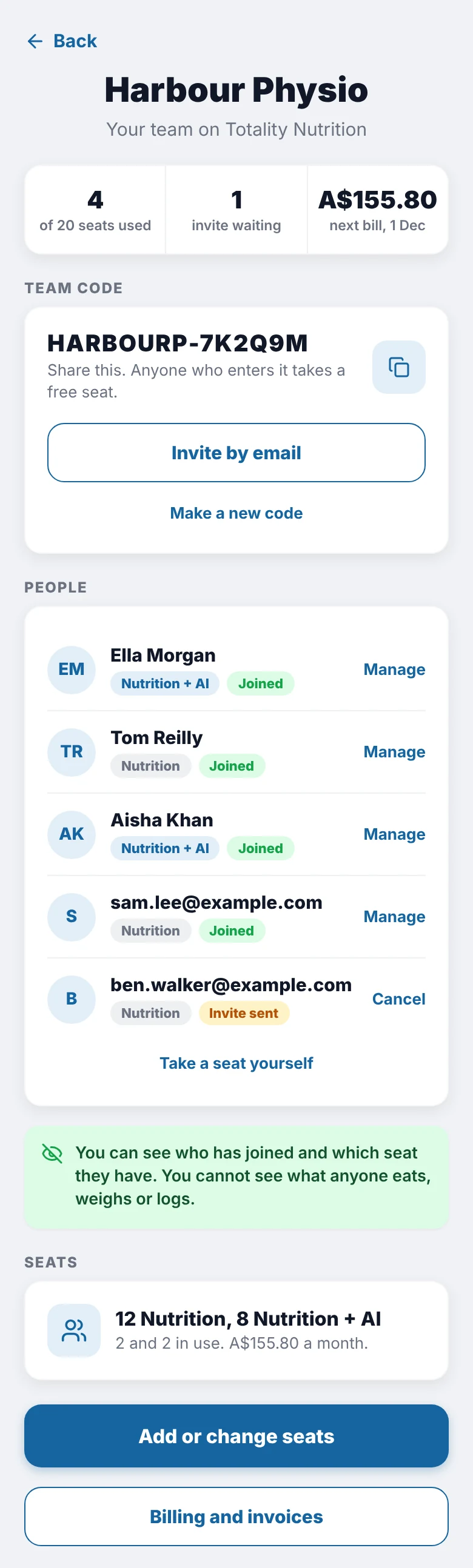
The team screen in Totality Nutrition, showing the team code, the people who have joined and the seats
Your team screen, shown with example data

Who uses a team

Any business that wants its people tracking food in the same app.

Coaches and trainers

Include a seat in your coaching packages so every client logs food in one app, on an account they keep.

Dietitians and clinics

Give patients a food diary with Australian food data and a full vitamin and mineral breakdown.

Gyms and studios

Hand out seats for a challenge, or add them to a membership tier.

Sports clubs

Cover a squad for the season and take seats off when it ends.

Workplaces

Offer seats as a staff health benefit, paid on one invoice.

Just you?

The personal plans start free. See Totality Nutrition

Seat prices

In Australian dollars, per person. Mix the two seat types however you like. A team starts at seats, which is a month on Nutrition seats.

Nutrition seat

a month, per seat

or a year, per seat

  • Food log with full history and barcode scanning
  • Macro targets and every vitamin and mineral
  • Meal plans, cookbook and a grocery list
  • Streaks, weight, photos and progress

The same plan people buy for themselves at a month.

New teams: Yearly teams already get 15% off, so the offer is for monthly teams only.

How a team works

  1. Set up your team

    Name it, pick how many of each seat you need, and choose monthly or yearly.

  2. Pay by card

    Payment is taken by Stripe. Invoices can carry your business name, address and ABN.

  3. Share your team code

    Send the code yourself, or type in email addresses and we send the invite for you.

  4. Your people join

    They sign up or sign in, open Settings, tap Teams and enter the code. Their seat is on straight away.

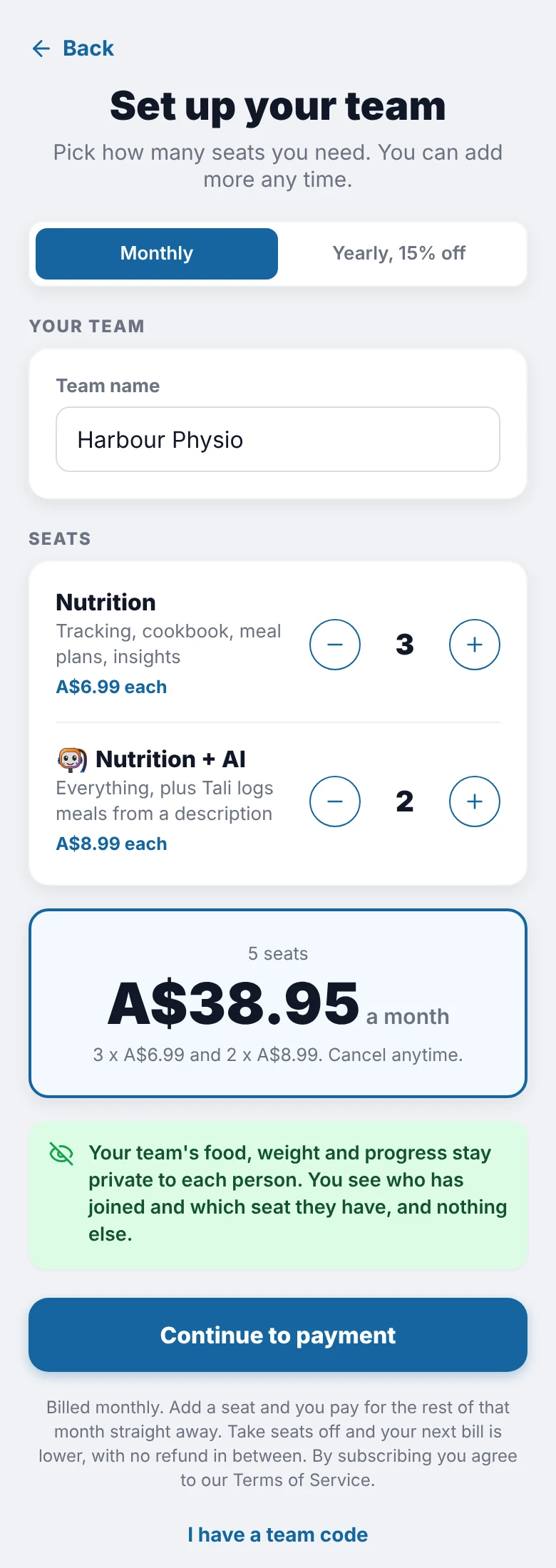
Setting up a team in Totality Nutrition: team name, seat counts and the monthly total
Setting up a team
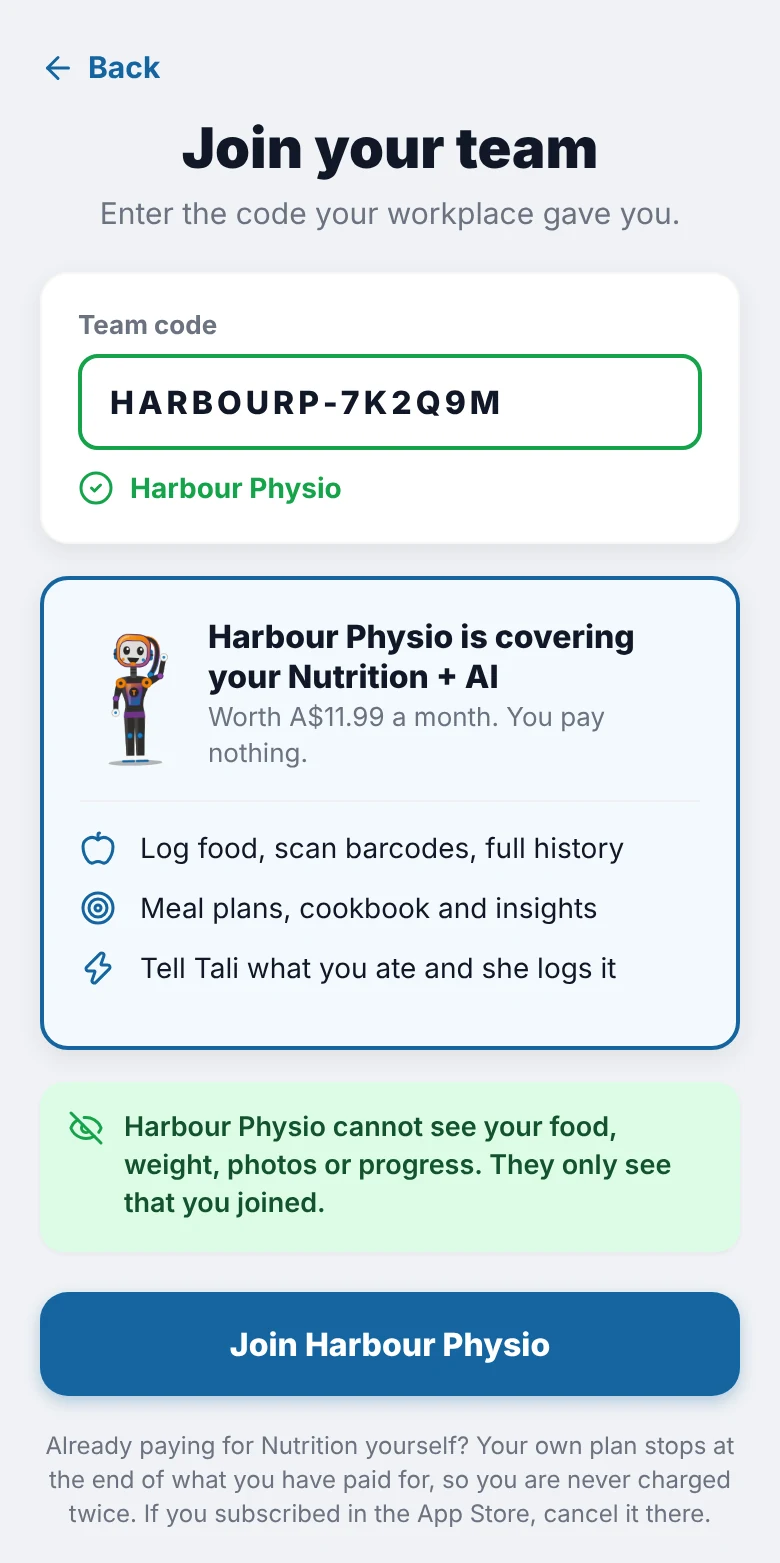
Joining a team in Totality Nutrition with a team code
Joining with a code

Their food stays private

People log honestly when they know nobody at work or at the gym is reading it.

What you see

  • Who has joined your team
  • Which seat each person has
  • Invites that are still waiting

What you never see

Food, calories, weight, photos and progress stay private to each person. There is no report or export of anyone's log for the team owner.

Common questions

How much does a team cost?

A Nutrition seat is A$6.99 a month or A$71.30 a year. A Nutrition + AI seat is A$8.99 a month or A$91.70 a year. Prices are per seat, in Australian dollars. A team starts at 3 seats.

Can I add or remove seats later?

Yes, from your team screen. An extra seat is charged straight away for the rest of the month or year. You can take off any seat nobody is using, and your next bill is lower. There is no refund for the time left on a seat you take off.

Can I mix seat types or move someone?

Yes. Buy any mix of Nutrition and Nutrition + AI seats, and move a person from one seat type to the other from your team screen.

What if someone already pays for Totality Nutrition?

When they join your team, their own plan stops at the end of what they have paid for, so they are never charged twice. Anyone who subscribed through the App Store cancels it there.

What happens when someone leaves, or the team ends?

They keep their account and their food history. Without a seat or a plan of their own they are on the Free plan.

How do I cancel?

Open Billing and invoices on your team screen. The team runs to the end of the period you have paid for, then ends.

Start with 3 seats. Add more any time from your team screen.