
Totality for gym owners
Compliance hub
Keep every staff member's certificates, checks and insurance on file, and see what is expiring before it lapses.
The Compliance hub keeps your staff's documents in one place, with expiry dates, so you know who is covered and who needs to renew. It is part of every gym plan Studio Club Enterprise.
Open More, then Staff, then Compliance. It is also in Settings, then Compliance Hub.
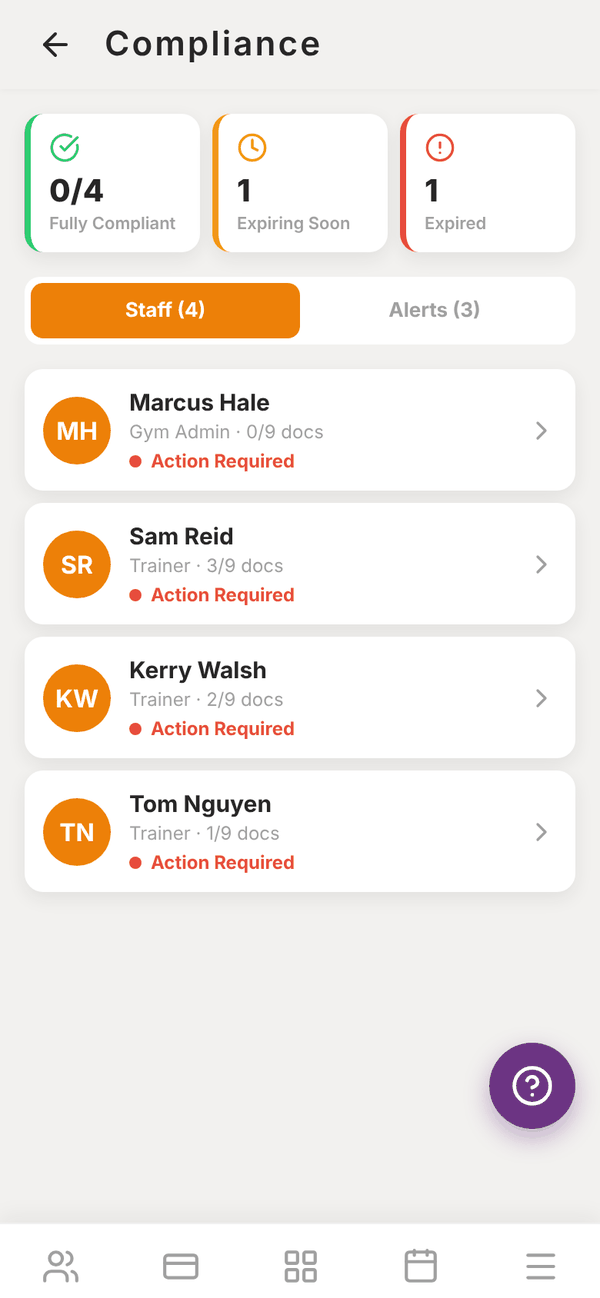
The overview#
Along the top:
- Fully Compliant: how many staff have every document, none expired (for example 0/4).
- Expiring Soon: documents expiring in the next 30 days.
- Expired: documents past their expiry date.
Two tabs sit below:
- Staff: everyone at your gym, including you, with how many documents they have (for example 3/9 docs) and a badge: Compliant, Expiring Soon or Action Required.
- Alerts: every document expiring in the next 60 days, most urgent first. Tap one to open that person.
The documents tracked#
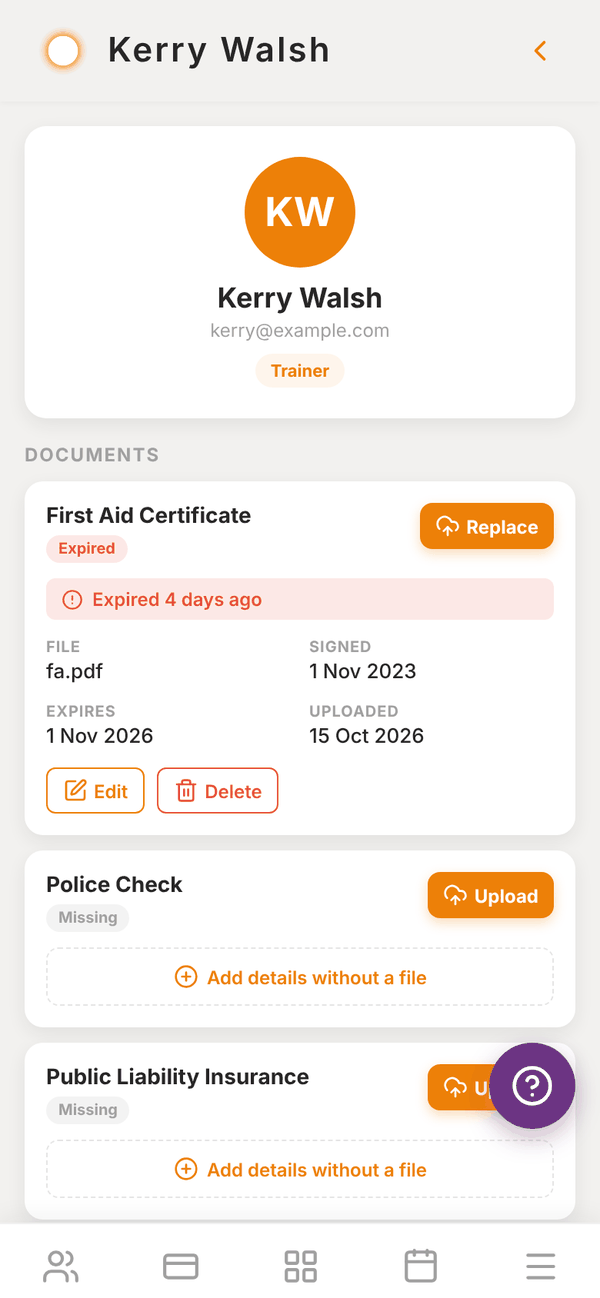
Each person has a checklist of nine document types:
- First Aid Certificate
- Police Check
- Public Liability Insurance
- Professional Indemnity Insurance
- Fitness Qualification/Certification
- Working With Children Check
- Contract/Agreement
- COVID Vaccination Record
- Other
Each one shows as Missing, active, Expiring Soon (within 30 days) or Expired. A document with no expiry date counts as active.
Add a document#
- Tap the staff member.
- Find the document type and tap Upload.
- Pick a PDF or a photo of the document.
- Add the Signed date, Expiry date (optional) and any Notes, then save.
No file to hand? Tap Add details without a file to record the dates now and upload later.
To change one, tap Edit. To swap in a renewed certificate, tap Replace. Tap View to open the file, or Delete to remove it.
Reminders#
When a document has expired or expires within 30 days, a row appears on your dashboard under Needs attention today, for example "1 compliance document expired". Tap it to open the hub.
Questions#
Can trainers upload their own documents?
Documents are added by you, the gym owner or admin, in the Compliance hub. Ask your trainers to send you their renewed certificates.
Who can see these documents?
Files are stored privately for your gym. Members cannot see them.
Do I need every document type for everyone?
No. The hub shows the full checklist so nothing is forgotten, but only you know what your staff need. Fully Compliant counts people with all nine on file and none expired.
Can I track member waivers here?
The hub is for staff. Member health questions and waivers are part of client intake.