
Totality for gym owners
More than one location
Run up to five locations under one login, step between them, share staff and memberships, and copy your set-up across.
On the Studio, Club and Enterprise plans you can run more than one location under one owner login. Each location has its own members, staff, schedule and Stripe payouts. You see them all together on All locations. Studio Club Enterprise
Open Locations from the QUICK ACTIONS on your dashboard. Once you have more than one, a bar at the top of the dashboard says "You are in" and the location's name, with Switch.
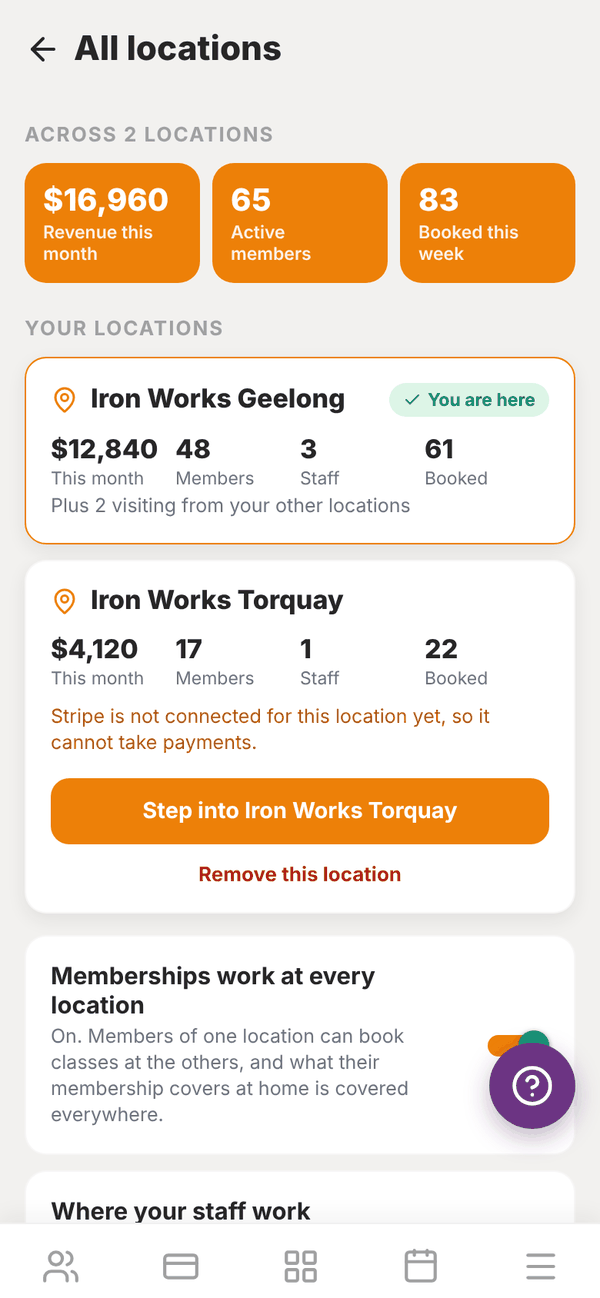
All locations#
The top of the screen shows your numbers across every location: Revenue this month, Active members and Booked this week.
Under YOUR LOCATIONS, each location has a card with this month's revenue, staff and bookings. The one you are in says You are here. A card warns you if Stripe isn't connected for that location yet, so it can't take payments.
Add a location#
- On All locations, tap Add a location.
- Type a Location name, like the suburb it's in.
- Check the price: each extra location is A$149.99 a month, billed beside your plan to the same card from today (yearly plans pay the yearly price).
- Tap Add location for A$149.99 a month.
- You see "Location added". Step into it to set it up.
You can have up to five locations in the app. More than five is a custom quote. If your account is gifted, extra locations are free while it stays gifted, and each one is charged from the day you start a paid plan.
Step into a location#
You work in one location at a time. Tap Step into on a location's card. The app restarts in that location so nothing from the last one is left on screen. Each location's takings go to its own Stripe account, so connect Stripe in each one. See Stripe Connect.
Where your staff work#
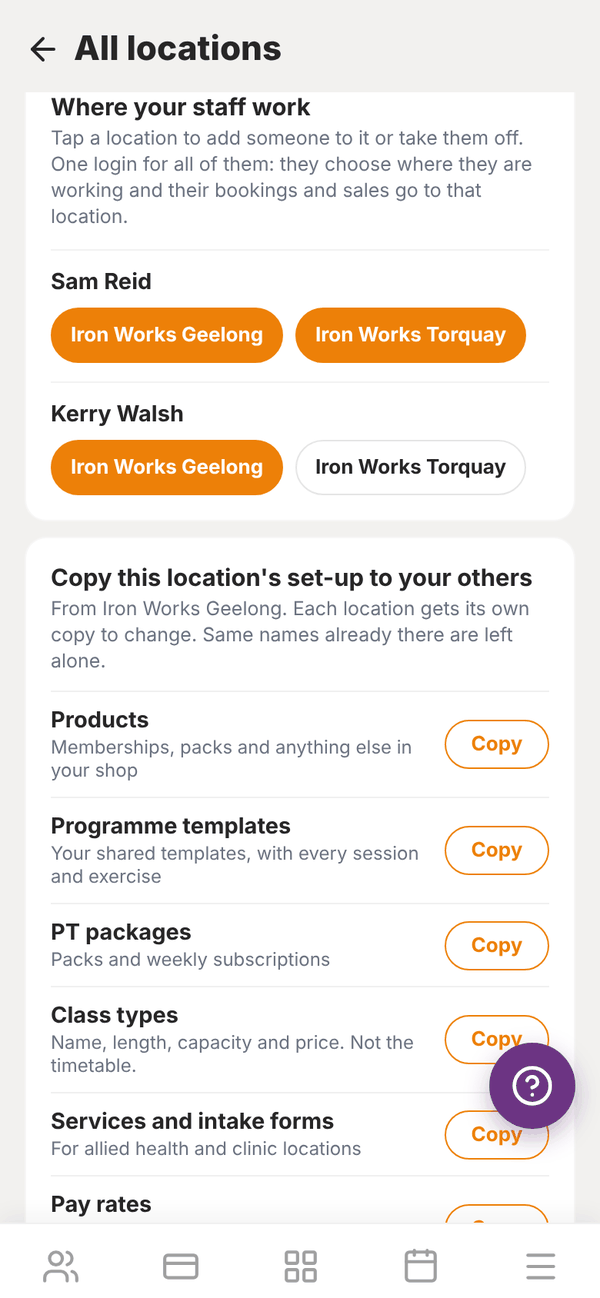
Where your staff work lists everyone on your team with a chip for each location. Tap a location to add someone to it or take them off.
Your staff keep one login. When they work at more than one location, the top of their dashboard asks Where are you working?. Bookings, sales and the member list follow the location they choose. Their own clients stay with them everywhere.
Memberships at every location#
Turn on Memberships work at every location if you run your locations as one chain. Members of one location can then see and book classes at your others, and a class their membership covers at home is covered everywhere. At the front desk, they show as visiting from another location. They never need a second membership.
Leave it off and each location keeps its own members.
Copy your set-up#
Set up one location properly, then copy it to the others. Under Copy this location's set-up to your others, tap Copy next to any of:
- Products: memberships, packs and anything else in your shop
- Programme templates: with every session and exercise
- PT packages: packs and weekly subscriptions
- Class types: name, length, capacity and price, not the timetable
- Services and intake forms: for allied health and clinic locations
- Pay rates: for staff who also work at the other location
Each location gets its own copy, which it can then change. Anything with the same name already there is left as it is. Nothing is removed.
Remove a location#
Tap Remove this location on its card. Only an empty location can be removed, so take its staff off first. When it's removed, its charge stops.
If the bill isn't paid#
If payment for your extra locations doesn't go through, All locations says so and the app tries your card again. If it stays unpaid, your extra locations are locked until it's paid. Nothing is deleted. Tap Update card, then I have paid, check again, and they open straight away. Your main location always stays open.
Questions#
Do I need a new login for each location?
No. One owner login runs them all. Step into the one you want to work in.
Do my staff need separate accounts?
No. Add them to each location they work at. They pick where they're working when they open the app.
Can a member use more than one location?
Yes, when Memberships work at every location is on.
Is there a limit?
Five locations in the app. Email admintotality@gmail.com for more.
Which plans can have more than one location?
Studio, Club and Enterprise, the gym plans. A trainer's own plan can't add locations.